
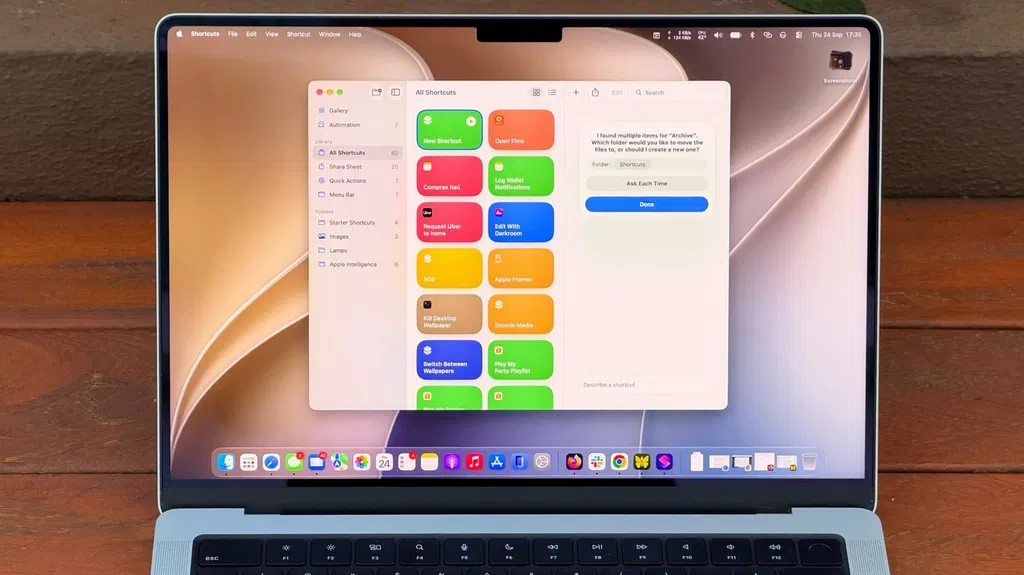
How to get started with Shortcuts on your MacBook
macOS 27 Golden Gate introduces an AI-powered feature called Describe a Shortcut that simplifies the creation of automation scripts in the Shortcuts app. Users can now type natural language prompts to generate complex workflows, such as organizing files or summarizing text, without needing to manually configure individual actions. The feature requires an M1 chip or later to utilize Apple Intelligence, making it unavailable for Intel-based Macs.
- ▪macOS 27 Golden Gate adds a Describe a Shortcut feature that uses AI to build automations from text prompts.
- ▪Providing specific details in prompts, such as file age and destination folders, improves the accuracy of the generated shortcuts.
- ▪Users can assign keyboard shortcuts or pin actions to the menu bar to ensure frequently used automations remain accessible.
- ▪The AI capabilities in Shortcuts require a Mac with an M1 chip or newer, excluding Intel-based systems from using this feature.
Engadget files mainly under tech. We currently carry 1,010 of its stories.
Story provenance
Source · retrieval · rights · ranking — open for full record
inspect →
Story provenance
Attribution is not the same as permission. This drawer separates discovery metadata, excerpts, WeSearch-generated summaries, reuse status, and whether the publisher receives the visit. Nothing here claims a legal grant the publisher has not made.
Record
| Original publisher | Engadget |
| Canonical URL | https://www.engadget.com/2269315/how-to-use-macbook-shortcuts/ |
| Publication time | Tue, 29 Sep 2026 00:30:00 +0000 |
| Retrieval time | 2026-09-29T01:13:03.685Z |
| Last seen | 2026-09-29T01:13:03.685Z |
| Headline source | Publisher (no WeSearch rewrite) |
| Excerpt source | publisher body |
| Excerpt method | First ~120 words (~800 chars) of extracted publisher body, fair-use limited. |
| Summary | WeSearch · cerebras-chat (WeSearch summarizer) |
| Summary source text | contentText |
| Citation coverage | Summary is a WeSearch-generated derivative; primary citation is the original publisher URL. |
| Cluster | F993TAX7yJQ_ · 1 stories |
| Cluster logic | Grouped by semantic title/content similarity across sources within a rolling window. Same-publisher template collisions are excluded from coverage comparison. |
| Ranking reason | Story pages are not engagement-ranked. Hub feeds use recency, with optional source-diversified chronological ordering (cap consecutive stories per source). No personalized ranking. |
| Publisher visit | Yes — open original |
| Substitutes article? | No — link-out required for full text |
Rights status (four layers)
WeSearch handling by dimension
| Indexing | May the item be indexed (stored, ranked, made findable)? | Allowed |
| Snippet | May a short excerpt of the publisher's text be shown? | Allowed |
| AI summary | May WeSearch generate its own short summary of the article? | Limited |
| Retrieval / RAG | May the content be exposed for third-party retrieval-augmented generation? | Not asserted |
| Model training | May the content be used to train AI models? | Not asserted |
| Commercial reuse | May the content be reused commercially? | Not permitted |
Basis: Derived from the published RSS/Atom feed. Contact: [email protected]. Reviewed: 2026-07-24.
Opening excerpt (first ~120 words) tap to expand
Big Tech Apple How to get started with Shortcuts on your MacBook Automate your Mac with ease using Shortcuts and Apple Intelligence. By Filipe Espósito Sept. 28, 2026 8:30 pm EST Filipe Espósito for Engadget Add Engadget on Google: Preferred Source Google Discover Shortcuts has been available on Mac since macOS Monterey, but it's one of those utilities many Mac users have never explored. At first, it can seem too complicated. You have to know which actions to choose and how to connect them, then hope it all works. But macOS 27 Golden Gate changes that with Describe a Shortcut, which lets you type exactly what you need and have Shortcuts do the heavy work for you with AI. It doesn't always work, but it makes the app much easier to use — especially if you're not an expert.
…
Excerpt limited to ~120 words for fair-use compliance. The full article is at Engadget.
Discussion
0 commentsMore from Engadget


