I put Claude Code in a browser terminal I built in Go
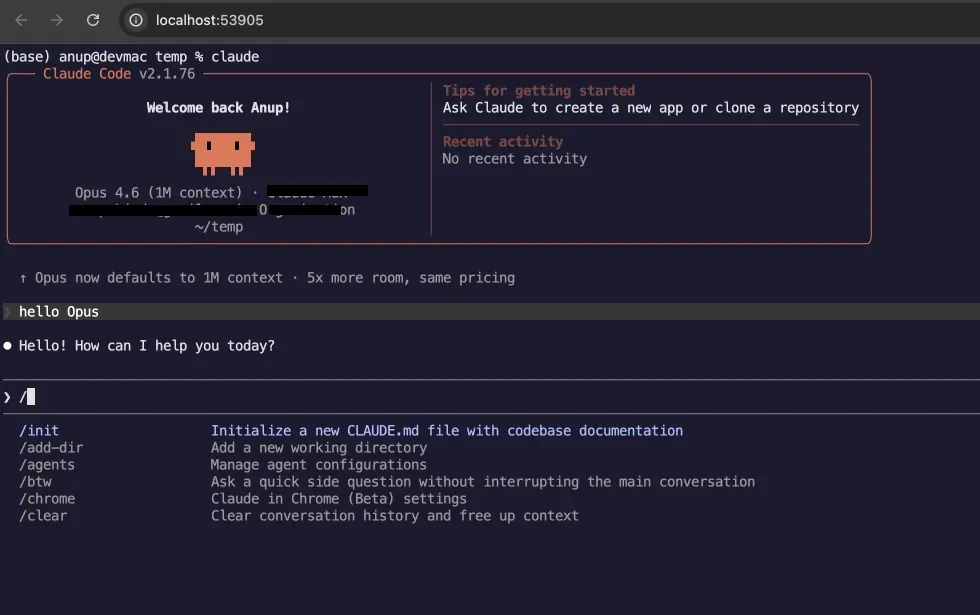
Anup Shinde created a browser-based terminal using Go, demonstrating the capabilities of the godom framework. The terminal successfully runs Claude Code without any special configurations. This setup also allows for convenient remote access via Tailscale by scanning a QR code.
- ▪The terminal example was built to test the godom framework.
- ▪It successfully spawns a real shell with a real PTY and pipes its I/O to a browser.
- ▪The implementation consists of around 250 lines of Go and a 60-line JavaScript adapter.
Opening excerpt (first ~120 words) tap to expand
Member-only storyI put Claude Code in a browser terminal I built in GoAnup Shinde6 min read·May 3, 2026--ListenSharePress enter or click to view image in full sizeClaude Code, in a browser tab. The shell is real, the PTY is real; only the rendering is xterm.I built a browser-based terminal in Go as an example for godom: real PTY, real shell, rendered via xterm.js in the browser.Then I ran Claude Code inside it. It just worked. No tweaks, no flags, no special handling.This is also accidentally a really nice way to use a remote machine over Tailscale: scan a QR code and get a terminal in your phone’s browser.Originally published at www.anupshinde.comIf you want to try it yourself, the godom repo has the example at examples/terminal/.The “wait, what?” momentThe terminal example in godom is…
Excerpt limited to ~120 words for fair-use compliance. The full article is at Medium.
Discussion
0 commentsMore from Medium