microsoft/VibeVoice
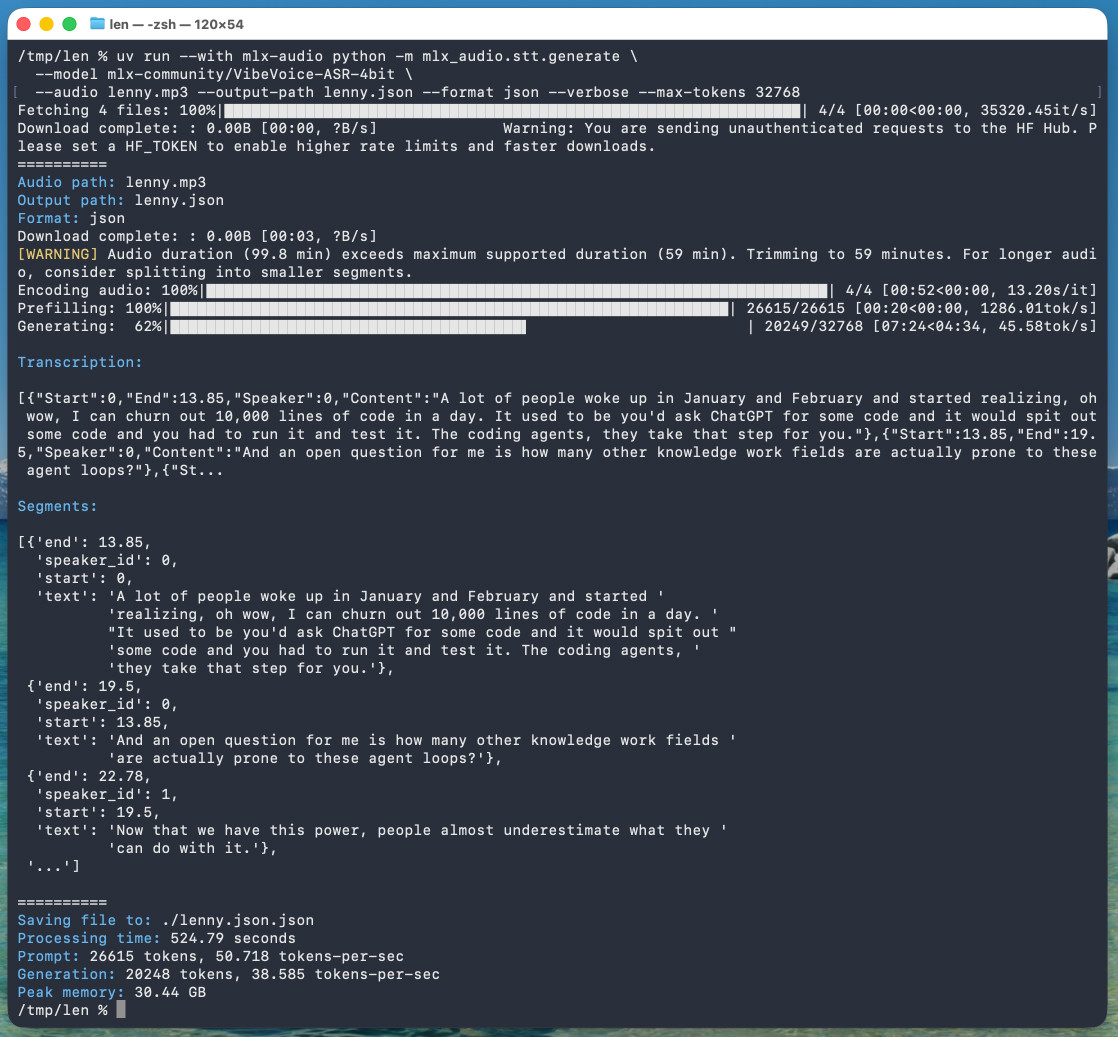
microsoft/VibeVoice VibeVoice is Microsoft's Whisper-style audio model for speech-to-text, MIT licensed and with speaker diarization built into the model. Microsoft released it on January 21st, 2026 but I hadn't tried it until today. Here's a one-liner to run it on a Mac with uv , mlx-audio (by Prince Canuma) and the 5.71GB mlx-community/VibeVoice-ASR-4bit MLX conversion of the 17.3GB VibeVoice-ASR model, in this case against a downloaded copy of my recent podcast appearance with Lenny Rachitsky
Full article excerpt tap to expand
microsoft/VibeVoice. VibeVoice is Microsoft's Whisper-style audio model for speech-to-text, MIT licensed and with speaker diarization built into the model. Microsoft released it on January 21st, 2026 but I hadn't tried it until today. Here's a one-liner to run it on a Mac with uv, mlx-audio (by Prince Canuma) and the 5.71GB mlx-community/VibeVoice-ASR-4bit MLX conversion of the 17.3GB VibeVoice-ASR model, in this case against a downloaded copy of my recent podcast appearance with Lenny Rachitsky: uv run --with mlx-audio python -m mlx_audio.stt.generate \ --model mlx-community/VibeVoice-ASR-4bit \ --audio lenny.mp3 --output-path lenny \ --format json --verbose --max-tokens 32768 The tool reported back: Processing time: 524.79 seconds Prompt: 26615 tokens, 50.718 tokens-per-sec Generation: 20248 tokens, 38.585 tokens-per-sec Peak memory: 30.44 GB So that's 8 minutes 45 seconds for an hour of audio (running on a 128GB M5 Max MacBook Pro). I've tested it against .wav and .mp3 files and they both worked fine. If you omit --max-tokens it defaults to 8192, which is enough for about 25 minutes of audio. I discovered that through trial-and-error and quadrupled it to guarantee I'd get the full hour. That command reported using 30.44GB of RAM at peak, but in Activity Monitor I observed 61.5GB of usage during the prefill stage and around 18GB during the generating phase. Here's the resulting JSON. The key structure looks like this: { "text": "And an open question for me is how many other knowledge work fields are actually prone to these agent loops?", "start": 13.85, "end": 19.5, "duration": 5.65, "speaker_id": 0 }, { "text": "Now that we have this power, people almost underestimate what they can do with it.", "start": 19.5, "end": 22.78, "duration": 3.280000000000001, "speaker_id": 1 }, { "text": "Today, probably 95% of the code that I produce, I didn't type it myself. I write so much of my code on my phone. It's wild.", "start": 22.78, "end": 30.0, "duration": 7.219999999999999, "speaker_id": 0 } Since that's an array of objects we can open it in Datasette Lite, making it easier to browse. Amusingly that Datasette Lite view shows three speakers - it identified Lenny and me for the conversation, and then a separate Lenny for the voice he used for the additional intro and the sponsor reads! VibeVoice can only handle up to an hour of audio, so running the above command transcribed just the first hour of the podcast. To transcribe more than that you'd need to split the audio, ideally with a minute or so of overlap so you can avoid errors from partially transcribed words at the split point. You'd also need to then line up the identified speaker IDs across the multiple segments.
This excerpt is published under fair use for community discussion. Read the full article at Simon Willison's Weblog.
Discussion
0 commentsMore from Simon Willison's Weblog